
Model IO
Model IO
Model I/O介绍
Model IO就是模型的输入输出+调用,包括提示词模板、模型调用、输出解析等。
都是很简单的内容,主要讲在工具模板的调用。
模型调用
先说最核心的模型调用部分
模型分类(按照功能分类)
- LLMs,也叫Text Model、非对话模型,无记忆,单次对话。
- Chat Models,也叫Chat Model、对话模型,有记忆,多轮对话。
- Embeddings,也叫Embedding Model、向量模型,用来做嵌入的。
1)LLMs非对话模型
输入: Str或者PromptTemplate
输出: Str
2)ChatModels对话模型
输入: 接收消息列表 List[BaseMessage] 或 PromptValue ,每条消息需指定角色(如SystemMessage、HumanMessage、AIMessage)
输出: 总是返回带角色的 消息对象 ( BaseMessage 子类),通常是 AIMessage。
3)Embeddings向量模型
输入: Str
输出: List[float]
具体调用方式
很简单,就是创建一个模型,然后填入参数执行invoke就调用了。(嵌入模型不是invoke)
import dotenv
import os
from langchain_openai import ChatOpenAI
# 加载环境变量
dotenv.load_dotenv()

# 设置 OpenAI 兼容的环境变量
os.environ["OPENAI_API_KEY"] = os.getenv("ZHIPU_API_KEY")
os.environ["OPENAI_BASE_URL"] = os.getenv("ZHIPU_BASE_URL")


# 初始化智谱模型(使用 OpenAI 兼容接口)
# 这就是重点创建模型。
llm = ChatOpenAI(model="glm-4.6")

response = llm.invoke("你好,智谱AI!请简单介绍一下你自己。")

print(response.content)
必须要传入的参数:
- api_key: API密钥,这里通过.env文件加载就不用显式传入(require)
- base_url: API地址,这里通过.env文件加载就不用显式传入(require)
- model: 模型名称(require)
其他参数:
- temperature: 温度,控制生成的随机性,越高越随机,越低越确定,取值范围0~1
- max_tokens: 最大生成token数,防止输出过长
(1 Token ≈ 1~1.8汉字 / 3-4英文字母)
为了方便自定义链的创建,官方实现了Runnable接口,有很多通用的调用方法抽象。
- invoke : 处理单条输入,等待LLM完全推理完成后再返回调用结果
- stream : 流式响应,逐字输出LLM的响应结果
- batch : 处理批量输入
嵌入模型调用:
from langchain_openai import OpenAIEmbeddings

# 初始化嵌入模型
embeddings = OpenAIEmbeddings(
    model="text-embedding-3-small",
    dimensions=1536,
)

# 向量化文本
text = "你好,请介绍一下自己"
vector = embeddings.embed_query(text) # 向量化单个文本

texts = ["你好,请介绍一下自己", "你好,请介绍一下自己"]
vectors = embeddings.embed_documents(texts) # 向量化多个文本

print(vector)
流式输出
# 初始化大模型
chat_model = ChatOpenAI(
model="gpt-4o-mini",
streaming=True # 启用流式输出
)
# 创建消息
messages = [HumanMessage(content="你好,请介绍一下自己")]
# 流式调用LLM获取响应

print("开始流式输出:")
for chunk in chat_model.stream(messages):
# 逐个打印内容块
print(chunk.content, end="", flush=True) # 刷新缓冲区 (无换行符,缓冲区未刷新,内容可能不会立即显示)
print("\n流式输出结束")
提示词模板
消息类型
最常用的几个:
- SystemMessage:系统消息,通常用于提供背景信息或规则。
- HumanMessage:用户消息,代表用户输入。
- AIMessage:AI消息,代表模型生成的回复。
- BaseMessage:基础消息,是所有消息类型的基础类。
其他:
- ChatMessage :可以自定义角色的通用消息类型
- FunctionMessage/ToolMessage :函数调用/工具消息,用于函数调用结果的消息类型
使用:
#1.导入相关包
from langchain_core.messages import SystemMessage, HumanMessage, AIMessage
# 2.直接创建不同类型消息
systemMessage = SystemMessage(
  content="你是一个AI开发工程师",
  additional_kwargs={"tool": "invoke_tool()"}
)
humanMessage = HumanMessage(
  content="你能开发哪些AI应用?"
)
aiMessage = AIMessage(
  content="我能开发很多AI应用, 比如聊天机器人, 图像识别, 自然语言处理等"
)
# 3.打印消息列表
messages = [systemMessage,humanMessage,aiMessage]

print(messages)
llm = ChatOpenAI(model="glm-4.6")
response = llm.invoke(messages)
print(response.content)接下来学习PromptTemplate和ChatPromptTemplate,它们分别对应了 LLM(大语言模型)(单轮对话) 和 Chat Model(对话模型)(多轮对话) 两种不同的底层交互模式。后面还有FewChatPromptTemplate。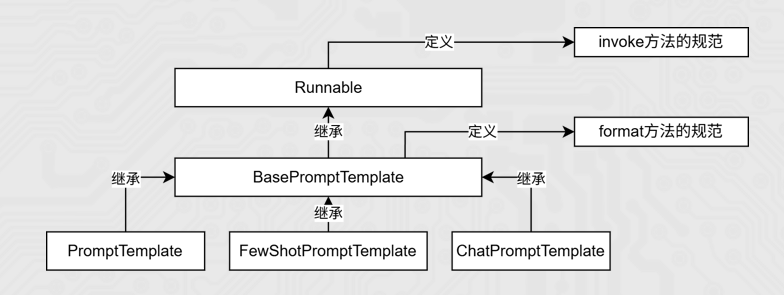
PromptTemplate
作用: 快速生成提示词
两种使用方式:
- 构造函数(不推荐)
from langchain.prompts import PromptTemplate
#定义多变量模板
template = PromptTemplate(
  template="请评价{product}的优缺点,包括{aspect1}和{aspect2}。",
  input_variables=["product", "aspect1", "aspect2"]
  )
#使用input_variables
prompt_1 = template.format(product="智能手机", aspect1="电池续航", aspect2="拍照质量")
print("提示词1:",prompt_1)

#使用partial_variables
template2 = PromptTemplate(
  template="{foo}{bar}",
  input_variables=["foo","bar"],
  partial_variables={"foo": "hello"}
)
prompt2 = template2.format(bar="world")
print(prompt2)
主要参数:
input_variables:输入变量列表
template:模板字符串
partial_variables:相当于传默认值
要通过format方法传入参数。
打印返回的就是字符串
- from_template
推荐,比较方便,不需要再写input_variables和partial_variables
from langchain.prompts import PromptTemplate
prompt_template = PromptTemplate.from_template(
"请给我一个关于{topic}的{type}解释。"
)
#传入模板中的变量名
prompt = prompt_template.format(type="详细", topic="量子力学")
print(prompt)

# 完整模板
full_template = """你是一个{role},请用{style}风格回答:
问题:{question}
答案:"""
# partial方法预填充角色和风格
partial_template = PromptTemplate.from_template(full_template).partial(
role="资深厨师",
style="专业但幽默"
)
# 只需提供剩余变量
print(partial_template.format(question="如何煎牛排?"))
通过format方法传入参数。打印返回的就是字符串
也都可以使用invoke方法,传入字典即可生成。返回的是一个 PromptValue 对象(可以无缝对接 LLM),并且支持异步、流式输出等高级特性。
from langchain.prompts import PromptTemplate

# 1. 定义模板
prompt_template = PromptTemplate.from_template("请给我一个关于{topic}的{type}解释。")

# 2. 使用 invoke 调用(返回的是 PromptValue 对象)
# 相比 format() 返回字符串,invoke 更适合在 Chain 中流转
response = prompt_template.invoke({"type": "详细", "topic": "量子力学"})

print(response)
# 输出类似: text='请给我一个关于量子力学的详细解释。'
print(response.to_string()) # 转化为纯文本
ChatPromptTemplate
它比普通 PromptTemplate 更适合处理多角色、多轮次的对话场景。
参数:列表参数格式是tuple类型
元组的格式为:(role: str | type, content: str | list[dict] | list[object])
具体使用
方式1(构造函数)不推荐:
from langchain_core.prompts import ChatPromptTemplate
#参数类型这里使用的是tuple构成的list
prompt_template = ChatPromptTemplate([
# 字符串 role + 字符串 content
("system", "你是一个AI开发工程师. 你的名字是 {name}."),
("human", "你能开发哪些AI应用?"),
("ai", "我能开发很多AI应用, 比如聊天机器人, 图像识别, 自然语言处理等."),
("human", "{user_input}")
])
#调用format()方法,返回字符串
prompt = prompt_template.invoke(input={"name":"小谷AI","user_input":"你能帮我做什么?"})
print(type(prompt)) # <class 8langchain_core.prompt_values.ChatPromptValue8>
print(prompt)
方式2(from_messages)推荐:
这里是from_messages,PromptTemplate是from_template。
因为ChatPromptTemplate是用于多轮对话的,所以需要传入列表参数。
# 导入相关依赖
from langchain_core.prompts import ChatPromptTemplate
# 定义聊天提示词模版
chat_template = ChatPromptTemplate.from_messages(
[
("system", "你是一个有帮助的AI机器人,你的名字是{name}。"),
("human", "你好,最近怎么样?"),
("ai", "我很好,谢谢!"),
("human", "{user_input}"),
]
)

# 这样也可以
# chat_prompt_template = ChatPromptTemplate.from_messages([
# SystemMessage(content="我是一个贴心的智能助手"),
# HumanMessage(content="我的问题是:人工智能英文怎么说?")
# ])


# 格式化聊天提示词模版中的变量
messages = chat_template.invoke(input={"name":"小明", "user_input":"你叫什么名字?"})
# 打印格式化后的聊天提示词模版内容
print(messages)
感觉没什么区别,还是都需要调invoke方法。
模板执行方式总结
- invoke
返回的是promptValue。
from langchain_core.prompts import ChatPromptTemplate
#参数类型这里使用的是tuple构成的list
prompt_template = ChatPromptTemplate([
# 字符串 role + 字符串 content
("system", "你是一个AI开发工程师. 你的名字是 {name}."),
("human", "你能开发哪些AI应用?"),
("ai", "我能开发很多AI应用, 比如聊天机器人, 图像识别, 自然语言处理等."),
("human", "{user_input}")
])
prompt = prompt_template.invoke({"name":"小谷AI", "user_input":"你能帮我做什么?"})
print(type(prompt))
print(prompt)
print(len(prompt.messages))
输出:
<class langchain_core.prompt_values.ChatPromptValue>
messages=[SystemMessage(content=8你是⼀个AI开发⼯程师. 你的名字是 小⾕AI.,
additional_kwargs={}, response_metadata={}), HumanMessage(content=你能开发哪些AI应
⽤?', additional_kwargs={}, response_metadata={}), AIMessage(content=我能开发很多AI应
⽤, ⽐如聊天机器⼈, 图像识别, ⾃然语⾔处理等.', additional_kwargs={}, response_metadata=
{}), HumanMessage(content=8你能帮我做什么?', additional_kwargs={}, response_metadata=
{})]- format
返回的是字符串
from langchain_core.prompts import ChatPromptTemplate
#参数类型这里使用的是tuple构成的list
prompt_template = ChatPromptTemplate([
# 字符串 role + 字符串 content
("system", "你是一个AI开发工程师. 你的名字是 {name}."),
("human", "你能开发哪些AI应用?"),
("ai", "我能开发很多AI应用, 比如聊天机器人, 图像识别, 自然语言处理等."),
("human", "{user_input}")
])
#方式1:调用format()方法,返回字符串
prompt = prompt_template.format(name="小谷AI", user_input="你能帮我做什么?")
print(type(prompt))
print(prompt)
输出:
<class 8str8>
System: 你是⼀个AI开发⼯程师. 你的名字是 小⾕AI.
Human: 你能开发哪些AI应⽤?
AI: 我能开发很多AI应⽤, ⽐如聊天机器⼈, 图像识别, ⾃然语⾔处理等.
Human: 你能帮我做什么?
提示
以上是最常用的,invoke是Runnable接口的调用方法,format是BaseMessages有的。
invoke传入字典k:V,返回PromptValue,需要toString()。支持MessagePlaceholder。
format是K=V。返回String。
- format_messages
from langchain_core.prompts import ChatPromptTemplate
prompt_template = ChatPromptTemplate([
("system", "你是一个AI开发工程师. 你的名字是 {name}."),
("human", "你能开发哪些AI应用?"),
("ai", "我能开发很多AI应用, 比如聊天机器人, 图像识别, 自然语言处理等."),
("human", "{user_input}")
])
#调用format_messages()方法,返回消息列表
prompt2 = prompt_template.format_messages(name="小谷AI", user_input="你能帮我做什么?")
print(type(prompt2))
print(prompt2)
<class 'list'>
[SystemMessage(content=8你是⼀个AI开发⼯程师. 你的名字是 小⾕AI.8, additional_kwargs=
{}, response_metadata={}), HumanMessage(content=8你能开发哪些AI应⽤?',
additional_kwargs={}, response_metadata={}), AIMessage(content=8我能开发很多AI应⽤, ⽐
如聊天机器⼈, 图像识别, ⾃然语⾔处理等.', additional_kwargs={}, response_metadata={}),
HumanMessage(content=8你能帮我做什么?', additional_kwargs={}, response_metadata={})]针对于ChatPromptTemplate,推荐使用 format_messages() 方法,返回消息列表。
容易和from_messages混淆。from_messages是构造函数,format_messages是执行方法。
- format_prompt
from langchain_core.prompts import ChatPromptTemplate
#参数类型这里使用的是tuple构成的list
prompt_template = ChatPromptTemplate([
# 字符串 role + 字符串 content
("system", "你是一个AI开发工程师. 你的名字是 {name}."),
("human", "你能开发哪些AI应用?"),
("ai", "我能开发很多AI应用, 比如聊天机器人, 图像识别, 自然语言处理等."),
("human", "{user_input}")
])
prompt = prompt_template.format_prompt(name="小谷AI", user_input="你能帮我做什么?")
print(prompt.to_messages())
print(type(prompt.to_messages()))
输出:
[SystemMessage(content=你是⼀个AI开发⼯程师. 你的名字是 小⾕AI., additional_kwargs=
{}, response_metadata={}), HumanMessage(content=你能开发哪些AI应⽤?',
additional_kwargs={}, response_metadata={}), AIMessage(content=我能开发很多AI应⽤, ⽐
如聊天机器⼈, 图像识别, ⾃然语⾔处理等.', additional_kwargs={}, response_metadata={}),
HumanMessage(content=你能帮我做什么?', additional_kwargs={}, response_metadata={})]
<class list>
记忆MessagesPlaceholder
它的作用是:在 Prompt 模板中预留一个“占位符”,用于动态插入不确定数量的消息。
多轮对话系统存储历史消息以及Agent的中间步骤处理此功能非常有用。
它的常见位置是在 SystemMessage 之后,HumanMessage 之前。
from langchain_core.prompts import ChatPromptTemplate, MessagesPlaceholder
from langchain_core.messages import AIMessage
prompt = ChatPromptTemplate.from_messages(
[
("system", "You are a helpful assistant."),
MessagesPlaceholder("history"),
("human", "{question}")
]
)
prompt.format_messages(
history=[HumanMessage(content="1+2*3 = ?"),AIMessage(content="1+2*3=7")],
question="我刚才问题是什么?")
history字段只是一个占位符,可以随便叫。
FewShotPromptTemplate
相当于提供一些示例,让模型学习到一些模式。
一个典型的 Few-Shot Prompt 由三个部分组成:
- Prefix(前缀): 任务说明(例如:“你是一个反义词生成器”)。
- Examples(示例): 提供给模型的参考案例。
- Suffix(后缀): 用户当前的实际输入。
examples = [
    {"word": "高兴", "antonym": "悲伤"},
    {"word": "高", "antonym": "矮"},
    {"word": "晴天", "antonym": "雨天"}
]

from langchain.prompts import PromptTemplate

# 创建一个格式化单个示例的模板
example_formatter = PromptTemplate(
    input_variables=["word", "antonym"],
    template="单词: {word}\n反义词: {antonym}\n"
)

from langchain.prompts import FewShotPromptTemplate

few_shot_prompt = FewShotPromptTemplate(
    examples=examples,                # 1. 你的示例列表
    example_prompt=example_formatter, # 2. 单个示例的格式化模板
    prefix="请给出以下单词的反义词。",    # 3. 前缀(任务说明)
    suffix="单词: {input}\n反义词:",     # 4. 后缀(用户输入的位置)
    input_variables=["input"],        # 5. 用户输入的变量名
    example_separator="\n"            # 6. 示例之间的分隔符
)

# 测试生成
print(few_shot_prompt.format(input="巨大"))

#调用大模型
llm.stream(few_shot_prompt.format(input="高兴"))
请给出以下单词的反义词。
单词: 高兴
反义词: 悲伤
单词: 高
反义词: 矮
单词: 晴天
反义词: 雨天
单词: 巨大
反义词:
微小FewShotChatMessagePromptTemplate
examples = [
    {"input": "你好,请问厕所在哪里?", "output": "敢问兄台,茅房何在?"},
    {"input": "我要买这把剑。", "output": "此剑与我有缘,店家开个价吧。"},
    {"input": "不管闲事。", "output": "江湖恩怨,与我无关。"}
]

example_prompt = ChatPromptTemplate.from_messages(
    [
        ("human", "{input}"),
        ("ai", "{output}"),
    ]
)

few_shot_prompt = FewShotChatMessagePromptTemplate(
    example_prompt=example_prompt, # 使用上面的格式
    examples=examples              # 使用上面的数据
)

final_prompt = ChatPromptTemplate.from_messages(
    [
        ("system", "你是一个武侠小说里的角色,说话要文绉绉的。"),
        few_shot_prompt,       # <--- 这里插入了模拟的对话历史
        ("human", "{input}"),  # 用户当前的实际输入
    ]
)
ExamplePrompt
# 示例列表(更丰富的语料库)
examples = [
    {"input": "你好,请问厕所在哪里?", "output": "敢问兄台,茅房何在?"},
    {"input": "我要买这把剑。", "output": "此剑与我有缘,店家开个价吧。"},
    {"input": "不管闲事。", "output": "江湖恩怨,与我无关。"},
    {"input": "谢谢你的帮助。", "output": "举手之劳,何足挂齿。"},
    {"input": "你是谁?", "output": "在下不过是一介浪子,姓名早已随风而逝。"},
    {"input": "快走吧。", "output": "山高水远,后会有期!"}
]

# 1. 定义 Example Selector (长度选择器)
# 注意:LengthBasedExampleSelector 内部会调用 example_prompt.format() 来计算长度。
# 对于 Chat 场景,建议 selector 使用简单的 PromptTemplate 仅用于长度估算。
example_selector = LengthBasedExampleSelector(
    examples=examples,
    example_prompt=PromptTemplate.from_template("Human: {input} AI: {output}"),
    max_length=200,  # 增大长度限制以适应中文
)

# 2. 将 Selector 传入 FewShotPrompt
few_shot_prompt = FewShotChatMessagePromptTemplate(
    example_prompt=ChatPromptTemplate.from_messages([("human", "{input}"), ("ai", "{output}")]),
    example_selector=example_selector, # 使用选择器代替静态的 examples=[]
)

final_prompt = ChatPromptTemplate.from_messages(
    [
        ("system", "你是一个武侠小说里的角色,说话要文绉绉的。"),
        few_shot_prompt,       # <--- 这里插入了模拟的对话历史
        ("human", "{input}"),  # 用户当前的实际输入
    ]
)
输出解析器
输出解析器(Output Parser)负责获取 LLM 的输出并将其转换为更合适的格式。
StrOutputParser
字符串解析器,它是一个简单的解析器,从结果中提取content字段
response = chat_model.invoke(messages)
parser = StrOutputParser()
#使用parser处理model返回的结果
result = parser.invoke(response)
#result现在是一个字符串
JsonOutputParser
JSON输出解析器,是一种用于将大模型的自由文本输出转换为结构化JSON数据的工具。
方式1:用户自己通过提示词指明返回Json格式
方式2:借助JsonOutputParser的 get_format_instructions() ,生成格式说明,指导模型输出JSON 结构
#方式1:用户自己通过提示词指明返回Json格式
result = chat_model.invoke(chat_prompt_template.format_messages(role="人工智能专
家",question="人工智能用英文怎么说?问题用q表示,答案用a表示,返回一个JSON格式"))

#方式2:借助JsonOutputParser的 get_format_instructions() ,生成格式说明,指导模型输出JSON 结构
# 定义Json解析器
parser = JsonOutputParser()
# 定义提示词模版
# 注意,提示词模板中需要部分格式化解析器的格式要求format_instructions
prompt = PromptTemplate(
template="回答用户的查询.\n{format_instructions}\n{query}\n",
input_variables=["query"],
partial_variables={"format_instructions": parser.get_format_instructions()},
)
# 5.使用LCEL语法组合一个简单的链
chain = prompt | chat_model | parser
# 6.执行链
output = chain.invoke({"query": "给我讲一个笑话"})
自定义函数
from langchain_core.output_parsers import StrOutputParser
from langchain_core.runnables import RunnableLambda
from langchain_core.prompts import PromptTemplate
from langchain_community.chat_models.tongyi import ChatTongyi

str_parser = StrOutputParser()
# 自定义,接收一个参数,返回一个值
my_func = RunnableLambda(lambda ai_msg: {"name": ai_msg.content})

model = ChatTongyi(model="qwen3-max")

first_prompt = PromptTemplate.from_template(
    "我邻居姓:{lastname},刚生了{gender},请起名,仅告知我名字,不要额外信息"
)

second_prompt = PromptTemplate.from_template(
    "姓名{name},请帮我解析含义。"
)

chain = first_prompt | model | my_func | second_prompt | model | str_parser

res: str = chain.invoke({"lastname": "张", "gender": "女儿"})
print(res)
print(type(res))
其他解析器
- XMLOutputParser
- CSVOutputParser
- YAMLOutputParser
等等